VDR Dashboard
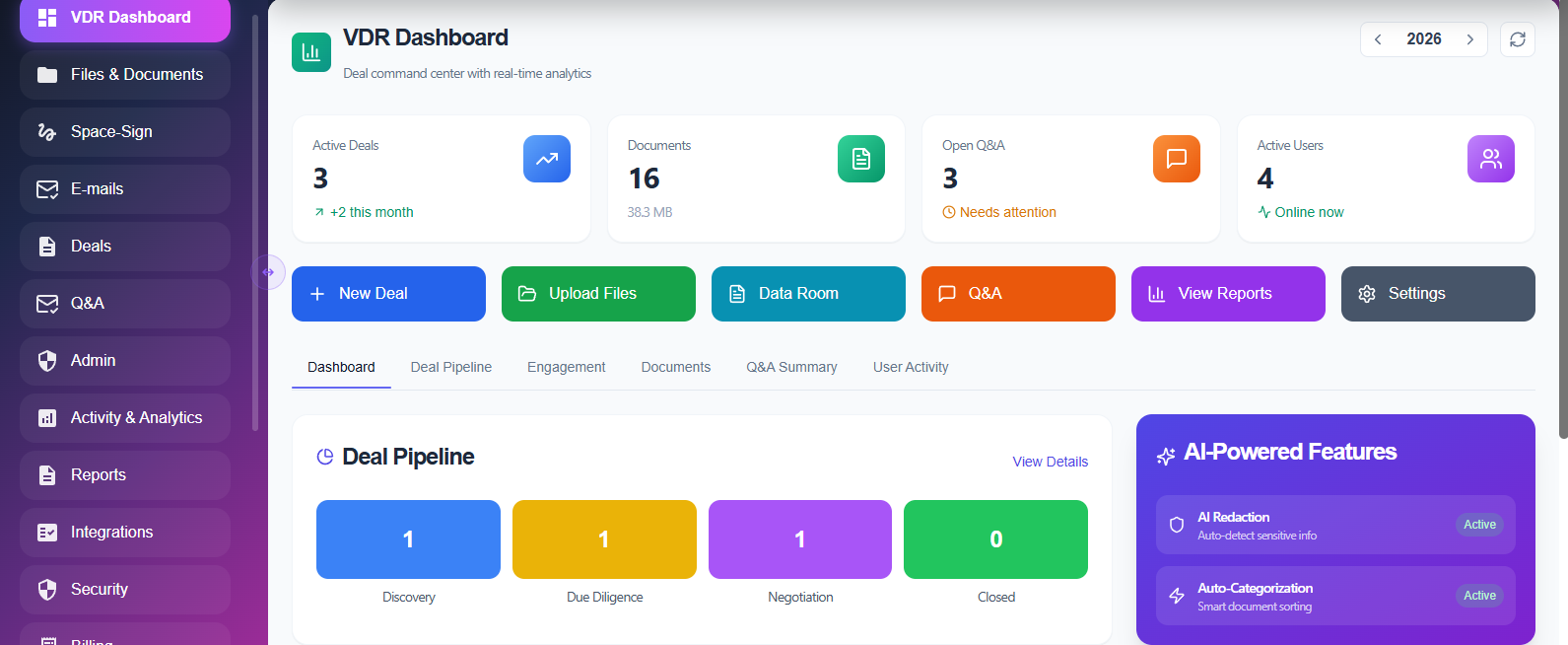
The Deal Command Center Dashboard provides a centralized overview of all deal activities within the Space Nexus platform, allowing teams to monitor transactions, documents, and collaboration in real time.
- Active deals, documents, Q&A requests, and users in one place
- AI-powered redaction and auto-categorization for secure document handling
- One-click access to Data Room, Q&A, Reports, and Settings
- Real-time deal pipeline tracking across transaction stages
- Quick actions for creating deals and uploading files
Everything Your Deal Team Needs at a Glance
The VDR Dashboard puts every deal metric, AI tool, and quick action within reach — so your team spends less time navigating and more time closing deals.
Unified Deal Overview
View active deals, document counts, open Q&A requests, and invited users in a single consolidated dashboard. No switching between modules to understand deal status.
AI-Powered Redaction
Automatically detect and redact sensitive information — PII, financial data, legal identifiers — before documents are shared with external parties. Always-on protection running silently in the background.
AI Auto-Categorization
Uploaded documents are analyzed and automatically sorted into the correct folder categories — financial statements, legal agreements, HR records, and more — saving hours of manual organization.
One-Click Module Access
Jump directly to Data Room, Q&A, Reports, or Settings from the dashboard without navigating through multiple menus. Every critical function is one click away, keeping deal teams focused.
Real-Time Deal Pipeline
Track each transaction across its lifecycle stages — from initial setup through due diligence, negotiation, and close. Identify bottlenecks and at-risk deals before they become problems.
Quick Actions
Create new deals, upload files, invite users, and send Q&A responses without leaving the dashboard. Quick action shortcuts reduce the time from decision to execution.
Your Deal Pipeline, Always in Focus
From the moment you log in, the Space Nexus dashboard surfaces what matters — active deal counts, pending Q&As, document activity, and AI task status.
Step 01
Open the Dashboard
See every active deal, total document count, open Q&A requests, and invited user count — all on the landing screen after login.
Step 02
AI Works in the Background
As documents are uploaded, AI Redaction and Auto-Categorization process them automatically. No manual triggers needed — status is visible on the dashboard.
Step 03
Navigate or Act in One Click
Jump to any deal's Data Room, Q&A inbox, Reports, or Settings directly from the dashboard. Or use Quick Actions to create a deal, upload files, or invite a user.
See the Dashboard in Your Deal
Schedule a personalized demo and see how the Space Nexus deal command center gives your team real-time visibility across every transaction.