Virtual Data Room Q&A Management
SpaceNexus Virtual Data Room Q&A software enables deal teams to manage due diligence questions and responses throughout M&A transactions. Track buyer questions, automate seller responses, and maintain a complete audit trail — all within your secure VDR.
- Centralized list of all questions and answers related to a deal
- Status tracking for Open, Answered, and Urgent questions
- Categorization by departments: Technical, Finance, HR, and Commercial
- Assign questions to specific teams or users
- Answer, edit, or delete questions directly from the interface
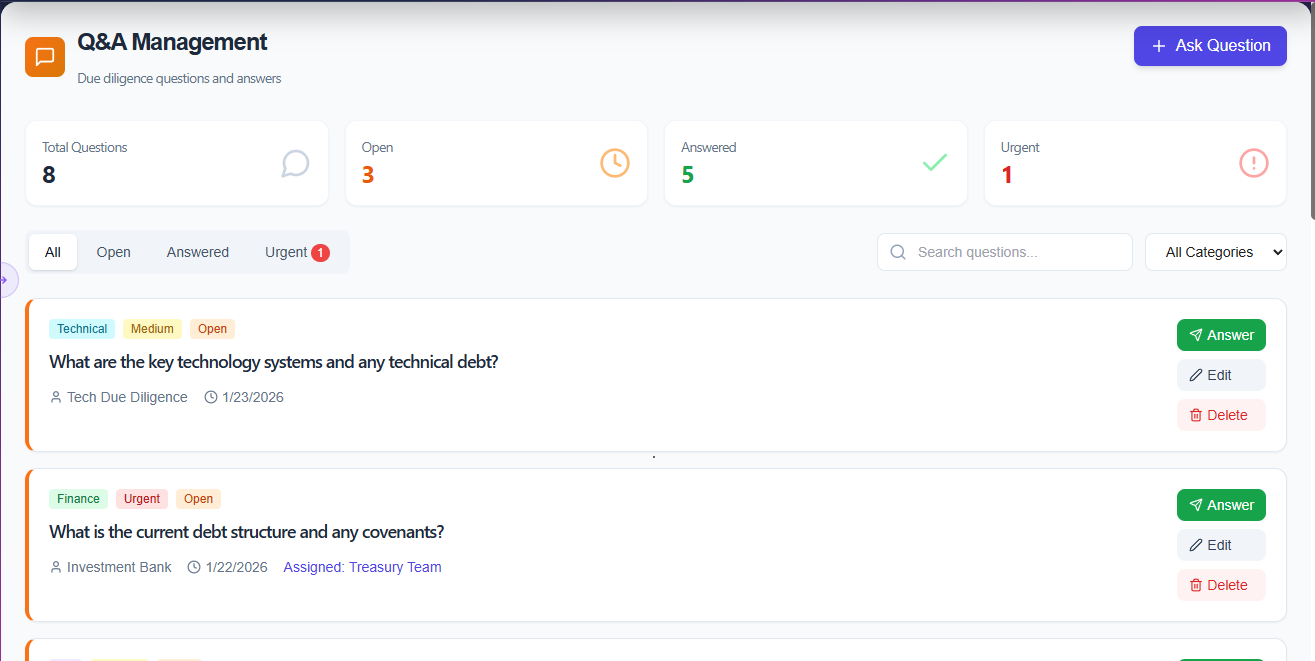
Structured Due Diligence, Start to Finish
Every question tracked, every response accountable, every department organized — so your diligence process runs without friction.
Centralized Q&A List
View all questions and answers related to a deal in one place. No more scattered emails or disconnected threads — every diligence question is captured in a single, structured interface.
Status Tracking
Track every question through its lifecycle with clear status labels — Open, Answered, and Urgent. Instantly identify which items need attention and ensure nothing is left unresolved.
Department Categorization
Organize questions by department — Technical, Finance, HR, and Commercial. Route queries to the right team automatically and keep your diligence process structured.
Team & User Assignment
Assign any question directly to a specific team or individual user. Ownership is clear, accountability is maintained, and response deadlines are never ambiguous.
Direct Question Actions
Answer, edit, or delete questions directly from the interface without navigating away. Streamlined action controls keep your team moving fast through the diligence checklist.
Audit Trail
Every question, response, edit, and deletion is logged with a timestamp and user record. Generate a complete Q&A history for compliance reviews and post-deal documentation.
From Question to Resolution — Without the Back-and-Forth
Space Nexus replaces scattered diligence emails with a structured Q&A workflow that keeps every question visible, assigned, and resolved on time.
Step 01
Submit & Categorize
Buyers submit questions directly into the platform. Each question is automatically tagged by department (Technical, Finance, HR, Commercial) and marked Open.
Step 02
Assign & Track
Assign questions to the right team or individual. Set priority flags for Urgent items and monitor status across all open questions from a single list.
Step 03
Answer & Export
Respond directly from the interface, edit or delete as needed. Export the full Q&A thread for post-deal documentation and compliance records.
Q&A Module FAQ
Common questions about SpaceNexus Q&A management.
What is a virtual data room Q&A module?
A VDR Q&A module is a structured communication tool built into virtual data rooms that allows buyers, investors, and advisors to ask questions about deal documents directly within the platform. Unlike email, Q&A modules provide tracked, auditable threads with automatic notifications and deadline management.
How does SpaceNexus Q&A differ from email-based due diligence?
SpaceNexus Q&A replaces scattered email threads with a centralized, searchable workspace. Every question is linked to specific documents, assigned to the right team member, tracked with SLA deadlines, and logged in an immutable audit trail — eliminating the risk of lost or overlooked questions during live deals.
Can I set deadlines and SLAs for Q&A responses?
Yes. SpaceNexus lets you set response deadlines for each question or batch of questions. The system sends automatic escalation alerts when deadlines approach, and overdue items are flagged in the dashboard — ensuring no question falls through the cracks during time-sensitive transactions.
Is the Q&A module included in all SpaceNexus plans?
Yes, Q&A management is included in all SpaceNexus plans. Starter plans include core Q&A features, while Professional and Enterprise plans add advanced workflows, bulk operations, role-based routing, and custom SLA configurations.
See Q&A Management in Action
Schedule a demo and see how Space Nexus replaces scattered diligence emails with a structured, trackable Q&A workflow.